



VertiGIS Studio or Esri’s Experience Builder:
Which is Right for Your ArcGIS Apps?
Book a Free Consultation
VertiGIS Studio goes beyond building simple web mapping apps with ArcGIS—it provides the enterprise-level tools needed to deliver the sophisticated apps your organization demands. ArcGIS Experience Builder is a useful tool for creating basic web apps, meanwhile thousands of organizations have chosen VertiGIS Studio as they need to take those apps further, faster, and with fewer resources.
VertiGIS Studio: A Clear Advantage for Enterprise GIS
VertiGIS Studio doesn’t just work with ArcGIS—it enhances it, providing the enterprise-level tools needed to solve complex challenges. While ArcGIS Experience Builder is a useful tool for creating basic web apps, VertiGIS Studio empowers organizations to go further, faster, and with fewer resources.
VertiGIS Studio vs. ArcGIS Experience Builder Table Comparison
Discover the advantage of VertiGIS Studio over ArcGIS Experience Builder.
| Capabilities | Why it Matters | VertiGIS Studio | ArcGIS Experience Builder |
|---|---|---|---|
Configurable Forms | Streamline user input to enforce consistency, reduce errors, and speed up workflows. |  Intuitive drag-and-drop design experience enables quick creation of sophisticated, dynamic web forms. Sophisticated forms can be built under an hour. That’s 10x faster than ExB, on average. The forms you build with Studio automatically deal with accessibility, error handling, internationalization, and dozens of other extras that take programmers days or weeks to complete otherwise. |  Sophisticated forms require advanced Excel configuration or custom coding, making them more complex to build and maintain. |
Reporting & Printing Tools | Easily generate high-res printable PDF maps and reports from your GIS data. | Dedicated, drag-and-drop template builders make it easy to design reports and print layouts directly in the web environment. Reports & print templates can be built 5x faster than ExB, on average. Printing in Studio gives access to large format, high-res outputs with precision layouts that can be a single page, or a map book including all the elements you need to convey your map information. | Professional report and print templates must be authored in external tools like Microsoft Word and ArcGIS Pro, adding complexity and time. Simple feature reporting and generic map templates are available, but not configurable. Map outputs are possible, but no equivalent printing or reporting capabilities exist. |
Automation Tools | Eliminate manual tasks by automating processes like data updates, record creation, approvals, and notifications, improving user efficiency and accuracy. | Prebuilt activities via drag-and-drop workflow design enable quick automation of repetitive GIS and business processes. Automation tools can be built 10x faster than ExB, on average. | Sophisticated automation requires custom coding and ongoing maintenance. Triggers offer only basic widget-to-widget actions. |
Enterprise System Integration | Connect systems so data moves seamlessly across GIS, ERP, EAM, and other business platforms, reducing data silos and duplicate work. | A library of activities specifically built for commonly used 3rd party systems. Integrations can be set up in a matter of hours. | Requires server-side work and custom widget development with ongoing maintenance. |
Security | Protect sensitive data with role-based access and authentication, ensuring only the right people view or edit critical information. | Granular, user-level control over services, layers, attributes, and UI components—consistent across Web, Mobile, and Desktop apps. An intuitive web interface makes applying fine-grained permissions simple. | Limited to basic map service level permissions. Extensive server-side work is required for fine-grained permissions. |
Application Monitoring | Track performance and usage to quickly identify issues, optimize resources, and ensure reliable applications. | Intuitive dashboards and logging tools make application monitoring simple. Enables proactive performance management and reduces troubleshooting time by monitoring apps, servers, and map services. | Only server and map service monitoring. No application monitoring available. |
Intuitive Searching | Find features quickly with a smarter search experience that avoids the complexity and frustration of traditional GIS searches. | Intuitive UI to index your data for lightning-fast search results and advanced search configurations to ensure your users get the results they expect. Generates search indexes and fully featured search configurations in minutes. | Requires server-side work and custom widget development with ongoing maintenance. |
Application Deployment / Management | Streamline application development with tiered deployments and shared components to increase productivity and reduce disruption. | Flexible multi-stage deployment strategies, from development to production in on-premises and cloud environments. Shared configuration model to reuse UI components, triggers / events and tools. | No shared components or application deployment strategy options. |
Configurable Forms
Streamline user input to enforce consistency, reduce errors, and speed up workflows.
Intuitive drag-and-drop design experience enables quick creation of sophisticated, dynamic web forms.
Sophisticated forms can be built under an hour. That’s 10x faster than ExB, on average.
The forms you build with Studio automatically deal with accessibility, error handling, internationalization, and dozens of other extras that take programmers days or weeks to complete otherwise.
Sophisticated forms require advanced Excel configuration or custom coding, making them more complex to build and maintain.
Reporting & Printing Tools
Easily generate high-res printable PDF maps and reports from your GIS data.
Dedicated, drag-and-drop template builders make it easy to design reports and print layouts directly in the web environment.
Reports & print templates can be built 5x faster than ExB, on average.
Printing in Studio gives access to large format, high-res outputs with precision layouts that can be a single page, or a map book including all the elements you need to convey your map information.
Professional report and print templates must be authored in external tools like Microsoft Word and ArcGIS Pro, adding complexity and time.
Simple feature reporting and generic map templates are available, but not configurable.
Map outputs are possible, but no equivalent printing or reporting capabilities exist.
Automation Tools
Eliminate manual tasks by automating processes like data updates, record creation, approvals, and notifications, improving user efficiency and accuracy.
Prebuilt activities via drag-and-drop workflow design enable quick automation of repetitive GIS and business processes.
Automation tools can be built 10x faster than ExB, on average.
Sophisticated automation requires custom coding and ongoing maintenance. Triggers offer only basic widget-to-widget actions.
Enterprise System Integration
Connect systems so data moves seamlessly across GIS, ERP, EAM, and other business platforms, reducing data silos and duplicate work.
A library of activities specifically built for commonly used 3rd party systems.
Integrations can be set up in a matter of hours.
Requires server-side work and custom widget development with ongoing maintenance.
Security
Protect sensitive data with role-based access and authentication, ensuring only the right people view or edit critical information.
Granular, user-level control over services, layers, attributes, and UI components—consistent across Web, Mobile, and Desktop apps.
An intuitive web interface makes applying fine-grained permissions simple.
Limited to basic map service level permissions. Extensive server-side work is required for fine-grained permissions.
Application Monitoring
Track performance and usage to quickly identify issues, optimize resources, and ensure reliable applications.
Intuitive dashboards and logging tools make application monitoring simple.
Enables proactive performance management and reduces troubleshooting time by monitoring apps, servers, and map services.
Only server and map service monitoring. No application monitoring available.
Intuitive Searching
Find features quickly with a smarter search experience that avoids the complexity and frustration of traditional GIS searches.
Intuitive UI to index your data for lightning-fast search results and advanced search configurations to ensure your users get the results they expect.
Generates search indexes and fully featured search configurations in minutes.
Requires server-side work and custom widget development with ongoing maintenance.
Application Deployment / Management
Streamline application development with tiered deployments and shared components to increase productivity and reduce disruption.
Flexible multi-stage deployment strategies, from development to production in on-premises and cloud environments.
Shared configuration model to reuse UI components, triggers / events and tools.
No shared components or application deployment strategy options.
Maintenance & Total Cost of Ownership
Building applications faster is only half the story – keeping them running smoothly over time is where the real savings emerge. VertiGIS Studio automatically aligns with ArcGIS updates, removing the burden of code maintenance and minimizing long-term risk. In contrast, Experience Builder apps that rely on custom code demand ongoing developer support and manual testing after every upgrade. The result: a much lower total cost of ownership with VertiGIS Studio.
Total Cost of Ownership
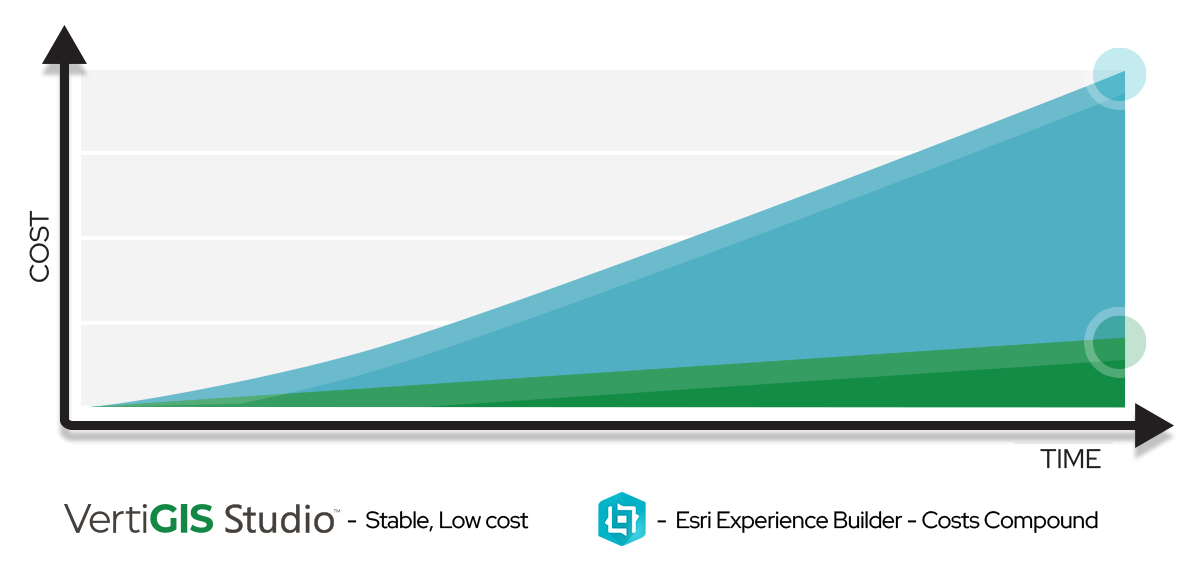
This chart visualizes the cost to build and maintain apps over time. The cost of ownership compounds at a higher rate with Experience Builder compared to VertiGIS Studio. The cost savings our customers see are multiplied by the number of apps they create: VertiGIS Studio gives administrators tools for easily managing a library of apps that share configuration and can be centrally upgraded or modified. In contrast, each app created with Experience Builder creates a new maintenance burden.
| Capabilities | VertiGIS Studio | ArcGIS Experience Builder |
|---|---|---|
Maintenance | Low – automatically aligns with ArcGIS changes, no code maintenance required: Centrally manage dozens of apps Handle dev, test, staging, and production migration of apps, across ArcGIS Enterprise Portals or ArcGIS Online, or in the same portal, with automation tools | High – upgrades add steps; custom code requires manual testing and fixes: No enterprise tools for management of multiple apps, or application deployment strategies |
Total Cost of Ownership | Low – rapid development, minimal technical skill required, and no code upkeep. | High – costs compound with custom components and ongoing developer maintenance. |
Maintenance
Low – automatically aligns with ArcGIS changes, no code maintenance required:
Centrally manage dozens of apps
Handle dev, test, staging, and production migration of apps, across ArcGIS Enterprise Portals or ArcGIS Online, or in the same portal, with automation tools
High – upgrades add steps; custom code requires manual testing and fixes:
No enterprise tools for management of multiple apps, or application deployment strategies
Total Cost of Ownership
Low – rapid development, minimal technical skill required, and no code upkeep.
High – costs compound with custom components and ongoing developer maintenance.
Customer Testimonials
See what our customers say about VertiGIS Studio.
“VertiGIS Studio spatial analytics technology has significantly enhanced our operations and maintenance processes, giving our staff the insights they need to work more effectively and efficiently.”
“Partnering with VertiGIS has enhanced our existing GIS platform. Instead of a one-size-fits-all solution that limited our ability to leverage internal expertise, we wanted to build our own tools and create features, functions, and reports tailored to the unique needs of our partners and end users.”
Maximize Your GIS Investment Today!
Fill out the form below for a free consultation and see how VertiGIS Studio lowers your total cost of ownership and boosts the long-term value of your GIS investment versus ArcGIS Experience Builder.