





 All Blog Articles
Written by Paul Van Haaren
Solutions Engineering Manager at VertiGIS

.
.
Modern geospatial platforms offer significant improvements in speed, scalability, and security while reducing costs and risks.
The growing importance of spatial thinking and geospatial intelligence is undeniable; it’s now critical for gaining a competitive edge. However, relying on outdated tools like Esri’s Web AppBuilder or Geocortex Essentials [any others?] can hinder progress, making rapid value delivery nearly impossible. Simply migrating these legacy solutions isn’t enough. Modernizing your geospatial infrastructure is essential to establish an agile, secure, and future-ready foundation for your enterprise.
The Hidden Costs of Technical Debt
Increasingly, legacy geospatial platforms create significant friction across an organization. While they may seem functional on the surface, they carry hidden costs that hinder growth and innovation.
- Security Exposure: Outdated frameworks rely on third-party plugins and custom widgets, creating potential attack vectors. Libraries with known vulnerabilities and inconsistent patching leave your security posture reactive and risky.
- Scalability and Performance Limits: Monolithic applications are difficult and expensive to scale. As user demand grows, performance degrades, leading to a poor user experience and wasted infrastructure spending.
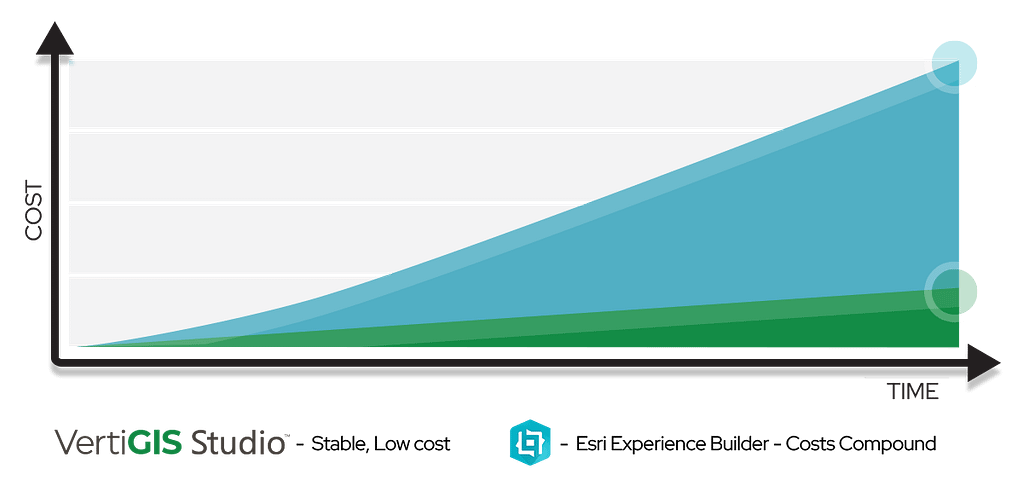
- Total Cost of Ownership (TCO): The true TCO goes far beyond licensing to include expensive maintenance labor, lost productivity from slow development, and emergency patching costs. Vendor support sunset dates also add risk, forcing migrations on an inconvenient timeline.
- Talent Constraints: Attracting and retaining top developers is difficult when they must maintain brittle applications built on aging technology. Your best people spend time on maintenance instead of innovation.
Moving Forward: A Pragmatic Playbook for Modernization
Modernizing your application portfolio doesn’t have to be a high-risk, “big bang” event. A phased, strategic approach minimizes disruption and maximizes business value along the way.
- Assess and Triage: Catalog all your applications. Evaluate criticality, usage, health, and risks. Decide to rebuild, retire, or consolidate.
- Prioritize by Value: Prioritize migration by value: target high-value, high-risk apps first. These “quick wins” build momentum and show modernization value.
- Design the Target Architecture: Design a modern, flexible target architecture: cloud-native, component-based, API-first. Include SSO for identity and robust observability for monitoring.
- Execute and Iterate: Execute with a pilot project using a high-value, medium-complexity app. Run new and old systems in parallel for smooth transition and learning. Iteratively refine before decommissioning. Emphasize change management and governance for adoption and standards.
Measuring What Matters
The success of your modernization effort should be measured in business outcomes, not just technical milestones. Key performance indicators (KPIs) will prove the ROI of your investment and confirm you are moving in the right direction.
- Speed: Track Time-to-Release for new features. It should decrease dramatically.
- Stability: Monitor Change Failure Rate and Mean Time to Recovery (MTTR). Both should drop as your architecture becomes more resilient.
- Security: Measure the number and severity of Security Findings from automated scans. This number should trend toward zero.
- Cost: Analyze Infrastructure Cost per User. It should decline as you adopt more efficient, scalable cloud services.
- Adoption: Keep a close eye on User Adoption Rates and Customer Satisfaction (CSAT) scores to ensure you are delivering a superior experience.
Tracking these metrics provides the data to justify the initiative and guide future investment decisions. But once the case for modernization is made, another critical choice emerges.
From Dilemma to Decision: Choosing the Right Modernization Path
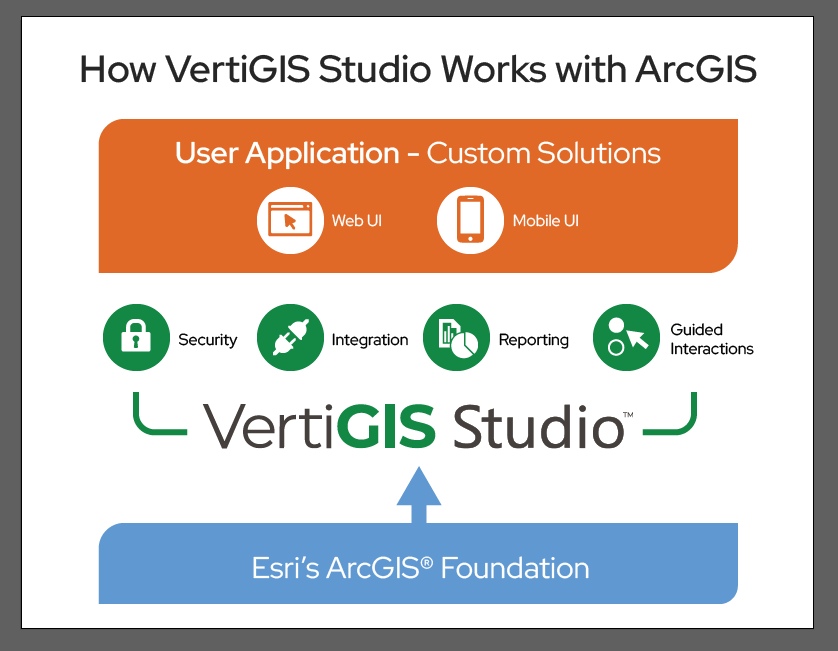
The case for modernization is clear, and the next step is choosing a platform that not only fixes legacy system flaws but also accelerates your business. For Esri users, ArcGIS Experience Builder is a good tool to create basic apps, but enterprise demands for security, scalability, and speed need a stronger solution. VertiGIS Studio offers an enterprise-grade acceleration layer to enhance your ArcGIS investment.
Accelerate Outcomes with an Enterprise-Ready Platform
VertiGIS Studio significantly enhances ArcGIS, offering a more efficient and sustainable approach to developing powerful applications. It streamlines your development lifecycle, allowing teams to achieve critical KPIs faster and with less effort than traditional methods.
- Build Sophisticated Applications Faster: Create purpose-built applications without the delays and costs of custom coding, accelerating your path to achieving key performance indicators.
- Out-of-the-Box Enterprise Functionality: Unlike Experience Builder, which often requires complex configurations or custom development for advanced needs, VertiGIS Studio delivers enterprise-grade features immediately.
- Streamlined Development:
- Dynamic Web Forms: Build sophisticated web forms using a drag-and-drop interface in under an hour, a significant improvement over complex Excel or code-based methods.
- Reporting & Printing: Create polished web-based reporting and printing templates up to five times faster.
- Automated Workflows: Deploy solutions ten times faster than custom-coded alternatives by automating complex business processes with a visual workflow builder.
- Accelerated Outcomes: Directly improve your Time-to-Release and achieve higher User Adoption rates.
De-Risking Your Operations and Lowering TCO
Modernization isn’t just about new apps; it’s about efficient maintenance. Here, Total Cost of Ownership (TCO) is key. Experience Builder customizations create technical debt, requiring developer support and manual testing with every ArcGIS update. This boosts costs, Change Failure Rate, and Mean Time to Recovery (MTTR).
VertiGIS Studio removes this burden. It automatically aligns with ArcGIS updates, eliminating code maintenance. Its architecture offers prebuilt activities for enterprise integration, consistent user-level security (web/mobile), and intuitive monitoring dashboards. Advanced features like interactive LRS analysis and indexed search are configurable, not custom-coded. This approach dramatically lowers Infrastructure Cost per User and reduces risk, keeping your geospatial platform stable and secure.
Now Is the Time to Act
For enterprises moving beyond basic map viewers, VertiGIS Studio offers a clear path. It ensures lower-risk, higher-velocity geospatial app modernization, letting you build faster, more securely on a sustainable foundation. Taking no action comes with risks, but advanced transition tools are available to help you develop agile, secure, and innovative geospatial capabilities that drive your business forward. The window of opportunity is now.
Discover why VertiGIS Studio outperforms Experience Builder. Visit our comparison page to see the difference.
All Blog Articles